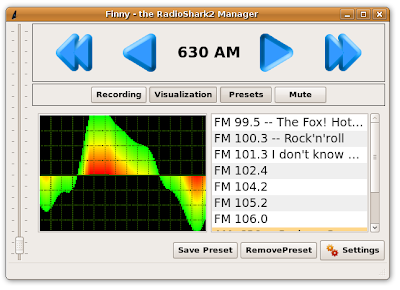
I recently got a Radioshark2, and with the help on the web I was very easily able to get it running in Ubuntu 9. The following posts were very helpful:
Radioshark Control LinkRadioshark Control Link 2After using the ./Shark2 control program to set a station, for live playback I use the command:
arecord -f dat -D hw:1,0 | aplayIt seems to me a basic GUI interface for the Radioshark for linux is lacking, so I did a little work on it over the past day. I basically cut and paste a lot of stuff together from these sources:
Alsa Tutorial 1Alsa Tutorial 2The result is a C++ class that I can use to play full-duplex (i.e. live captured and playback) sound off the Radioshark. It's still very basic (no proper error handling, not hardware independent etc,etc..) but it seems like a decent first step.
/* Use the newer ALSA API */
#define ALSA_PCM_NEW_HW_PARAMS_API
#include <alsa/asoundlib.h>

#include <iostream>
#include <string>

/*
   compile: g++ AudioInterface.cpp `pkg-config --cflags --libs alsa` -o AudioInterface

*/
using namespace std;

class AudioInterface
{
public:
   snd_pcm_t *hCapture;
     snd_pcm_t *hPlayback;

   //Hopefully both devices can share these
   snd_pcm_hw_params_t *CaptureParams;//,*PlaybackParams;
   snd_pcm_uframes_t frames;
   snd_pcm_sw_params_t *Capture_sw_params;

   char *buffer;
   unsigned int period;
   int buffer_size;

   /*handle to callback*/
   snd_async_handler_t *pcm_callback;

public:
   unsigned int GetPeriod(void)
   {
       if(period > 0)
       {
           return period;
       }else{
           1;
       }
   };
   static void OnPCMData(snd_async_handler_t *pcm_callback )
   {

       //cout<<" PCM DATA ARRIVED."<<endl;
       AudioInterface* interface = (AudioInterface*) snd_async_handler_get_callback_private(pcm_callback);
       if(!interface->hPlayback || !interface->hCapture)
       {
           return;
       }

       snd_pcm_t *pcm_handle = snd_async_handler_get_pcm(pcm_callback);
       snd_pcm_sframes_t avail;
       int rc = 0;

       avail = snd_pcm_avail_update(interface->hCapture);
       while ( avail >= interface->frames) {
           //cout<<"loop ---"<<avail<<endl;
           rc = snd_pcm_readi(interface->hCapture, interface->buffer,interface->frames);
           if ( rc < 0) {
               fprintf(stderr,"Read error: %s\n", snd_strerror(rc));
           }
           if ( rc != interface->frames ) {
               fprintf(stderr,"Read error: read %i expected %i\n", rc, (int)interface->frames);
           }else{
               //cout<<"read:"<<rc<<endl;
           }

           rc = snd_pcm_writei(interface->hPlayback,interface->buffer,interface->frames);
           if( rc < 0 )
           {
               fprintf(stderr,"Write Error: %s\n", snd_strerror(rc));
           }
           if ( rc == -EAGAIN){
               fprintf(stderr,"Underrun: %s\n", snd_strerror(rc));
           }else if( rc == -ESTRPIPE ){
               fprintf(stderr,"Suspend: %s\n", snd_strerror(rc));
           }else if( rc == -EPIPE ){
               fprintf(stderr,"EPIPE: %s\n", snd_strerror(rc));
               snd_pcm_prepare(interface->hPlayback);
           }/*else if( rc != interface->frames){
               fprintf(stderr,"Write error: written %i expected %i\n", rc, (int)interface->frames);
           }*/

                      /* if (err < 0) {

           if ( rc < 0) {
               fprintf(stderr,"Write error: %s\n", snd_strerror(rc));
           }
           if ( rc != interface->frames ) {
               fprintf(stderr,"Write error: written %i expected %i\n", rc, (int)interface->frames);
           }else{
               //cout<<"wrote:"<<rc<<endl;
           }*/

           avail = snd_pcm_avail_update(interface->hCapture);

       }
       //cout<<"UNHANDLED : "<<avail<<endl;

   };
   AudioInterface()
       :hCapture(NULL)
       ,hPlayback(NULL)
       //,PlaybackParams(NULL)
       ,CaptureParams(NULL)
       ,buffer(NULL)
       ,pcm_callback(NULL)
       ,Capture_sw_params(NULL)
       ,buffer_size(0)
   {

   };
   ~AudioInterface()
   {

   };

   bool Open(const string& capture_dev,const string& output_dev)
   {
       int dir = 0;
       unsigned int val = 0;
       int rc = 0;

       //Open the playback device (ought to be "default")
       rc = snd_pcm_open(&hPlayback, output_dev.c_str(),
                   SND_PCM_STREAM_PLAYBACK, 0 );
         if (rc < 0)
       {
               fprintf(stderr,
                   "unable to open pcm playback device: %s\n",
                       snd_strerror(rc));
               return false;
         }
       //Open the capture device-- we'll have to look for it.
       //For now we'll use hw:1,0
       rc = snd_pcm_open(&hCapture, capture_dev.c_str(),
                   SND_PCM_STREAM_CAPTURE  , 0 );
         if (rc < 0)
       {
               fprintf(stderr,
                   "unable to open pcm capture device: %s\n",
                       snd_strerror(rc));
               return false;
         }
       /* Allocate a hardware parameters object. */
       snd_pcm_hw_params_alloca(&CaptureParams);
       //snd_pcm_hw_params_alloca(&PlaybackParams);

         /* Fill it in with default values. */
       snd_pcm_hw_params_any(hCapture, CaptureParams);
       //snd_pcm_hw_params_any(hPlayback, PlaybackParams);

       /* Set the desired hardware parameters. */

       /* Interleaved mode */
       snd_pcm_hw_params_set_access(hCapture, CaptureParams,
                     SND_PCM_ACCESS_RW_INTERLEAVED);
       //snd_pcm_hw_params_set_access(hPlayback, PlaybackParams,
               //      SND_PCM_ACCESS_RW_INTERLEAVED);

       /* Signed 16-bit little-endian format */
       snd_pcm_hw_params_set_format(hCapture, CaptureParams,
                             SND_PCM_FORMAT_S16_LE);
       //snd_pcm_hw_params_set_format(hPlayback, PlaybackParams,
               //              SND_PCM_FORMAT_S16_LE);

       /* Two channels (stereo) */
       snd_pcm_hw_params_set_channels(hCapture, CaptureParams, 2);
       //snd_pcm_hw_params_set_channels(hPlayback, PlaybackParams, 2);

       /* 44100 bits/second sampling rate (CD quality) */
       val = 44100;
       snd_pcm_hw_params_set_rate_near(hCapture, CaptureParams,
                                 &val,0);
       //snd_pcm_hw_params_set_rate_near(hPlayback, PlaybackParams,
               //                  &val,0);

       /* Set period size to 32 frames. */
       frames = 32;
       //if(snd_pcm_hw_params_test_period_time(hCapture,CaptureParams,frames,0)!=0)
       //{
       //    cout<<"Can't handle 32 frames."<<endl;
       //}
       snd_pcm_hw_params_set_period_size_near(hCapture,
                             CaptureParams, &frames, &dir);
       //snd_pcm_hw_params_set_period_size_near(hPlayback,
               //              PlaybackParams, &frames, &dir);


        /* Use a buffer large enough to hold one period */
       snd_pcm_hw_params_get_period_size(CaptureParams, &frames,0);
       cout<<"capture frames :"<<frames<<endl;
       //snd_pcm_hw_params_get_period_size(PlaybackParams, &frames,0);
       //cout<<"playback frames:"<<frames<<endl;


       /* We want to loop for 5 seconds */
       snd_pcm_hw_params_get_period_time(CaptureParams,
                                   &period, &dir);


       cout<<"Period: "<<period<<endl;

       buffer_size = frames*4*4 ; /* 2 bytes/sample, 2 channels */
       cout<<"Frames :"<<frames<<" size: "<<buffer_size<<endl;
       //buffer = (char *) malloc(size);
       buffer = new char[buffer_size];

       /* Write the parameters to the Capture driver */
       rc = snd_pcm_hw_params(hCapture, CaptureParams);
       if (rc < 0)
       {
           fprintf(stderr,
               "unable to set hw parameters: %s\n",
               snd_strerror(rc));
           return false;
         }

       /* Write the parameters to the Playback driver */
       rc = snd_pcm_hw_params(hPlayback, CaptureParams);
       if (rc < 0)
       {
           fprintf(stderr,
               "unable to set hw parameters: %s\n",
               snd_strerror(rc));
           return false;
         }

       /* setup the software parameters */
       snd_pcm_sw_params_malloc (&Capture_sw_params);
       snd_pcm_sw_params_current ( hCapture , Capture_sw_params);
       snd_pcm_sw_params_set_start_threshold( hCapture , Capture_sw_params , buffer_size/2);
       snd_pcm_sw_params_set_avail_min( hCapture , Capture_sw_params , frames );

       snd_pcm_sw_params( hCapture , Capture_sw_params );


       /* connect up our callback*/
       snd_async_add_pcm_handler(&pcm_callback,hCapture,AudioInterface::OnPCMData,(void*)this);

       /* Startup */
       snd_pcm_start(hCapture);


       return true;

   };

   void Close(void)
   {
       if(pcm_callback)
       {
           snd_async_del_handler(pcm_callback);
       }
       if(hCapture)
       {
           snd_pcm_drain(hCapture);
             snd_pcm_close(hCapture);
       }
       if(hPlayback)
       {
           snd_pcm_drain(hPlayback);
           snd_pcm_close(hPlayback);
       }
       //if(PlaybackParams)
       ///{
       //    snd_pcm_hw_params_free(PlaybackParams);
       //}
       if(CaptureParams)
       {
           //snd_pcm_hw_params_free(CaptureParams);
       }
       if( Capture_sw_params)
       {
           //snd_pcm_sw_params_free (Capture_sw_params);

       }
       delete [] buffer;
   };

};

int main(int argc, char* argv[])
{

   cout<<"AUDIO API TEST"<<endl;
   cout<<"PROGRAM START"<<endl;

   //Open audio interface
   AudioInterface ai;
   if(!ai.Open(string("hw:1,0"),string("default")))
   {
       cout<<"Failed to open audio interface. Exiting..."<<endl;
       exit(-1);
   }

   //play for 5 seconds
   unsigned int loops = 10000000 / ai.GetPeriod();
   //cout<<"Will run for "<<loops<<" loops."<<endl;

     while ( loops > 0 ) {
           loops--;
       sleep(1);


   }

   //close audio interface
   ai.Close();

   cout<<"PROGRAM COMPLETE"<<endl;
}